9 n8n workflows for three businesses. Run every one yourself.
n8n is a workflow automation tool, like Zapier or Make. A workflow is a chain of steps that runs on its own: when a form is sent or an order comes in, it looks things up, decides, updates the right apps, and tells a person when something needs them.
I built 9 of them for three made-up businesses: a coffee roaster on Shopify, a bookkeeping firm and a recruiting agency. Each has a test form you can fill in. Everything runs here in your browser, on test events or on your own answers. Need this for your business, or hiring for n8n? Get in touch.
- Workflows you can run
- 9
- Nodes inside them
- 107
- Test events to run them on
- 37
- Branches, every one tested
- 37/37
Copperleaf Coffee Roasters
Copperleaf roasts about 900 pounds a week: retail bags and subscriptions through Shopify, plus 40 cafés and restaurants on wholesale. Nine people, one roaster, and nobody whose job is IT. The owner wanted three things off her plate: wholesale inquiries that sat in an inbox for days, a roast schedule copied by hand from Shopify every morning, and running out of a best-seller because nobody looked at stock until it hit zero. n8n Cloud runs the glue, so there is no server to look after.
- Workflows
- 3
- Nodes
- 34
- Test events
- 14
- Where
- Asheville, North Carolina; ships across the US
The team, where n8n runs and the apps it connects
The sample team
- Maya Okoye Owner and wholesale lead
- Theo Brandt Head roaster
- Jess Liang Packing and shipping
- Sam Ortiz Operations (owns n8n)
Where n8n runs
n8n Cloud, Starter plan. The workload is a few hundred executions a day, so a hosted instance costs less than anyone’s time spent patching a server.
n8n FormShopifyHubSpot (free CRM)Google SheetsGoogle DriveGmailSlack
Copperleaf Coffee Roasters is a fictional business. The people, orders, prices, emails and links are samples.
Try it: send the workflow your own answers
Fill it in as a customer would, press Send, then watch workflow 01 · Wholesale inquiry run on your answers. Nothing is sent or stored.
Sent
Thanks! Maya will be in touch by email shortly.
How the form reaches n8n, and the settings that matter.
How it is set up (4 notes for builders)
- Field labels are the keysThe Form Trigger outputs each answer under its label, plus submittedAt and formMode. Edit Fields renames them straight away.
- Respond When: Form Is SubmittedThe thank-you page shows at once. With Workflow Finishes, a slow HubSpot would keep the café staring at a spinner, and a failure would show them an error.
- Test URL and production URLThe test URL works while the editor listens for a test event, and the submission appears on the canvas. The production URL works once the workflow is published, and its runs appear under Executions.
- Ignore Bots, no attributionIgnore Bots skips link previewers and crawlers. Append n8n Attribution is off, so the page carries Copperleaf’s name only.
Pick a workflow, pick a test event, press Execute
Each tab is one workflow. The problem and What I built are the short version; pick a test event and press Execute workflow to watch it run.
For n8n builders: the simulator follows n8n’s rules. Nodes run once per item, an If or Switch can send items down several outputs in one execution, v1 order finishes each branch before the next, a node with no input items does not run, branches meet at a Merge, and a failed production execution starts the error workflow. New to the words? Open the decoder.
Wholesale inquiry
A café fills in the wholesale form. Within a minute it is in HubSpot with a fit score, and it has an answer that suits its size: a call with the owner, the price list, or a pointer to the subscription.
The problem
Wholesale inquiries arrived as contact-form emails in a shared inbox. Maya answered the big ones when she saw them and the rest when she had time, which could be a week. Nothing reached the CRM unless someone typed it in, and a café doing 60 pounds a week got the same wait as an office ordering four.
What I built
The website links to an n8n form. Edit Fields cleans the answers, a Code node scores the fit from volume, type of business and espresso focus, and HubSpot gets the contact, created or updated by email. A Switch then answers by tier: priority leads go to #wholesale and get a personal note from Maya with a booking link; standard ones get the price list attached from Google Drive; small ones are pointed to the café subscription. If HubSpot is down, the error output posts to Slack so someone adds the lead by hand, and the café still gets its email.
- Execution order
- v1 (recommended)
- Error workflow
- None
- Timezone
- America/New_York
- Save successful runs
- Yes
Why these settings (3)
- Timezone America/New_York, the roastery’s, with Use Workflow Timezone on in the form, so submittedAt reads in local time in HubSpot and Slack.
- Save successful production executions is on. At a few inquiries a day the history costs nothing and answers “did this café ever get an email?”
- No error workflow: the one external call that can fail, HubSpot, has its own error output. A failure anywhere else shows in Executions, which Sam checks each Monday.
The workflow’s nodes, drawn top to bottom so it fits any screen; on n8n’s canvas the same nodes run left to right. Scroll inside it; each node gets a green tick and its item count when the run reaches it.
- Trigger · n8n Form TriggerWholesale inquiry form
Hosted by n8n at its production URL, linked from the Wholesale page. Eight fields, five required. Respond When: Form Is Submitted, so the café sees the thank-you page at once while the workflow runs.
Parameters
- Form Title
- Wholesale coffee for your business
- Respond When
- Form Is Submitted
- Options
- Append n8n Attribution off · Ignore Bots on · Use Workflow Timezone on
- Edit Fields (Set)Clean up the answers
Manual Mapping, Include Other Input Fields off. Renames the form’s labels to snake_case keys, trims and lowercases the email, and makes the weekly volume a Number, so nothing later depends on how a label is worded.
Parameters
{{ $json.Email.trim().toLowerCase() }}- first_name
{{ $json['Your name'].trim().split(' ')[0] }}- lbs_per_week (Number)
{{ Number($json['Coffee per week (lbs)']) }}- submitted_at
{{ $json.submittedAt }}
- Code · JavaScript · Run Once for Each ItemScore the fit
Scores 0 to 100 from pounds a week, type of business and espresso focus, and picks a tier: priority (30 lb or more, or 70 points), standard (10 lb or more) or small. The weights are in one place, so Maya can change them without touching anything else.
Parameters and code
// Code node, JavaScript, Mode: Run Once for Each Item. // $input.item is the item being processed; return one item back. const j = $input.item.json; const lbs = Number(j.lbs_per_week) || 0; // Volume carries most of the score. Wholesale pricing starts at 10 lb a week, // and 50 lb a week is a café that reorders every Monday. let score = Math.min(Math.round(lbs * 1.2), 60); const typePoints = { 'Café or coffee shop': 25, 'Restaurant': 15, 'Grocery or retail': 15, 'Office': 10, }; score += typePoints[j.business_type] ?? 5; // Espresso bars reorder like clockwork and need the most training, so // Maya wants to meet them in person. if (j.focus === 'Mostly espresso') score += 15; score = Math.min(score, 100); const tier = lbs >= 30 || score >= 70 ? 'priority' : lbs >= 10 ? 'standard' : 'small'; return { json: { ...j, fit_score: score, tier } }; - HubSpot · Contact › Create or UpdateAdd to HubSpot
Matches on email, so a café that writes twice updates one contact instead of making two. Sets company, lifecycle stage Lead and two custom properties, fit score and pounds a week. On Error is Continue (using error output): if HubSpot fails, the item leaves through the Error output instead of stopping the run.
Copperleaf HubSpot (app token)On Error: error output
Parameters
{{ $json.email }}- Company Name
{{ $json.business_name }}- Lifecycle Stage
- Lead
- Custom Properties
- wholesale_fit_score =
{{ $json.fit_score }}· lbs_per_week ={{ $json.lbs_per_week }}
Success- → Carry on either way
ErrorHubSpot answered with an error. The item carries it and goes on.- Slack · Message › SendTell #wholesale HubSpot missed it
Names the café and the error, and says the reply email is still going out, so nobody writes to them twice. Sam adds the contact by hand.
Copperleaf Slack (bot)
Parameters
- Channel
- #wholesale
- Text
- HubSpot did not take
{{ $('Score the fit').item.json.business_name }}:{{ $json.error.message }}
- → Carry on either way
- Merge · AppendCarry on either way
Input 1 is the Success output, input 2 the Slack post after an error. Only one of them ever gets the item, and Append passes on whatever arrived, so the café is answered whether or not HubSpot was up.
Parameters
- Mode
- Append
- Switch · RulesRoute by tier
Reads the tier back from the Code node with $(), since the items arriving here are HubSpot’s answer or the Slack post, not the lead. Fallback Output: Extra Output, named Small.
Parameters
- Value
{{ $('Score the fit').item.json.tier }}- Rules
- is equal to priority · is equal to standard
- Fallback Output
- Extra Output (Small)
Prioritytier is equal to priority- Slack · Message › SendPost to #wholesale
Block Kit message with who, where, volume, score and their note, so Maya can decide on her phone whether to call before her email lands.
Copperleaf Slack (bot)
Parameters and body
- Channel
- #wholesale
- Message Type
- Blocks
{ "blocks": [ { "type": "header", "text": { "type": "plain_text", "text": "Wholesale lead: {{ $('Score the fit').item.json.business_name }}" } }, { "type": "section", "fields": [ { "type": "mrkdwn", "text": "*Who*\n{{ $('Score the fit').item.json.contact_name }}" }, { "type": "mrkdwn", "text": "*Where*\n{{ $('Score the fit').item.json.location }}" }, { "type": "mrkdwn", "text": "*Volume*\n{{ $('Score the fit').item.json.lbs_per_week }} lb a week, {{ $('Score the fit').item.json.focus }}" }, { "type": "mrkdwn", "text": "*Fit*\n{{ $('Score the fit').item.json.fit_score }}/100" } ] }, { "type": "section", "text": { "type": "mrkdwn", "text": "{{ $('Score the fit').item.json.message || '_No message_' }}" } } ] } - Gmail · Message › SendNote from Maya
Sent from Maya’s own Gmail, so the reply reaches her. Plain text, one link to book a call and taste samples, and Append n8n Attribution turned off: by default the Gmail node adds a “sent automatically with n8n” line.
Maya’s Gmail (OAuth2)
Parameters
- To
{{ $('Score the fit').item.json.email }}- Subject
- Coffee for
{{ $('Score the fit').item.json.business_name }} - Email Type
- Text
- Options
- Append n8n Attribution off · Sender Name Maya Okoye
- End
Standardtier is equal to standard- Google Drive · File › DownloadGet the price list
Downloads the current price list PDF by file ID into binary property data. Maya replaces the file in Drive when prices change, and the workflow never needs editing.
Copperleaf Google (OAuth2)
Parameters
- File
- By ID · Copperleaf Wholesale Price List 2026.pdf
- Put Output File in Field
- data
- Gmail · Message › SendSend the price list
Attachments: data, the PDF from the step before. Same sender and settings as Maya’s note, and an offer of samples rather than a call.
Maya’s Gmail (OAuth2)
Parameters
- To
{{ $('Score the fit').item.json.email }}- Attachments
- data
- Options
- Append n8n Attribution off · Sender Name Maya Okoye
- End
SmallFallback: nothing above matched- Gmail · Message › SendSuggest the café subscription
Under 10 pounds a week the wholesale minimum does not work for either side, so this points to the office and café subscription instead, kindly and with a discount code.
Maya’s Gmail (OAuth2)
Parameters
- To
{{ $('Score the fit').item.json.email }}- Options
- Append n8n Attribution off · Sender Name Maya Okoye
- End
Running with your own form answers, at your local time. What the rest of the world does: (your choice under the form). Nothing is sent or stored.
- Pick a test event above, then press Execute workflow. Each line is one node, with the time it ran and how many items it passed on; open Output to see them. Messages a person would read (Slack, email, tasks, HTTP responses) are shown as they would arrive. Waits of days are fast-forwarded.
The same workflow in n8n
Exported from this page’s data, imported into n8n 2.43 and captured from its editor. Copy it and paste it onto any n8n canvas, or download the file and import it; connect your own credentials before running it.
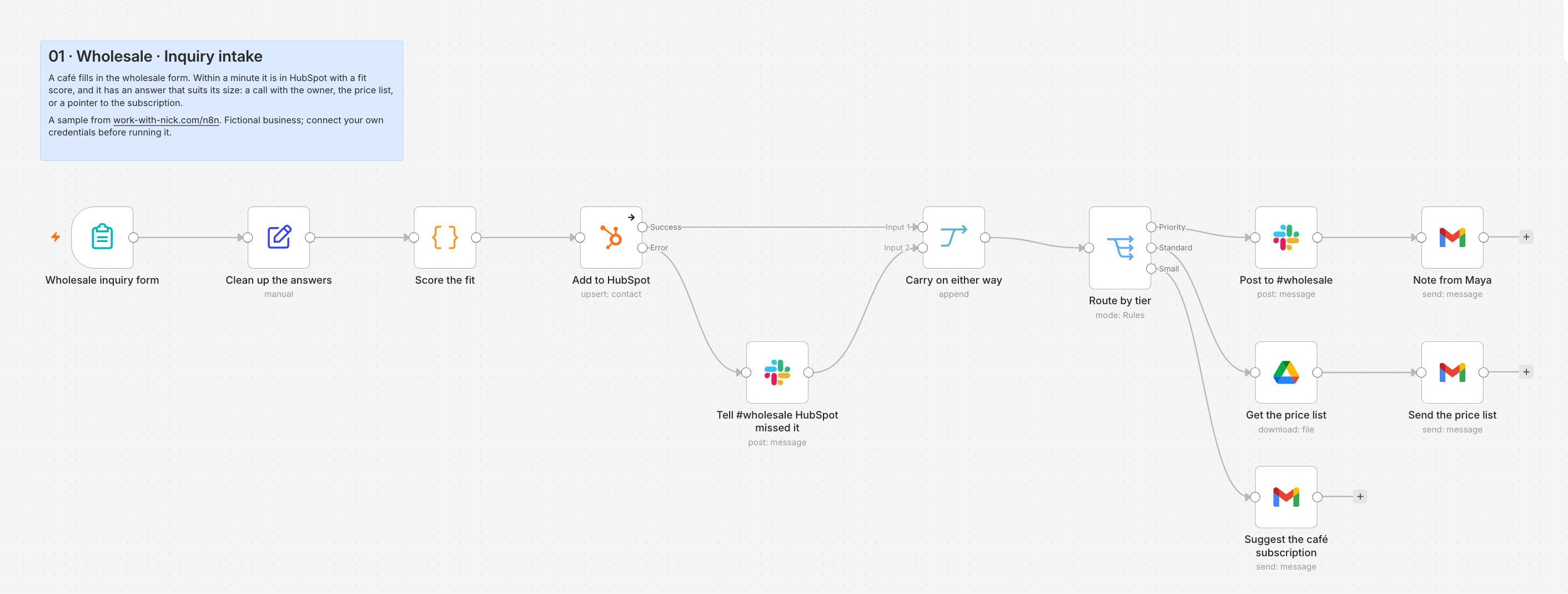
Build notes
The detail an n8n builder would check before trusting this workflow. Start with What if… for the unusual cases in plain words. Words you may not know
- The same café submits twiceHubSpot Create or Update matches the email and updates the existing contact. The email goes out again, which is right: they asked again. If repeat inquiries ever became a nuisance, a HubSpot Get before the Switch could check when the last one was.
- A typo in the emailThe Form Trigger’s Email field rejects anything that is not an address. A real but wrong address bounces back to Maya’s inbox, where she sees it next to the Slack post.
- HubSpot is down or the token was revokedThe Error output fires on the first failure. #wholesale gets the café’s name and the error, and the email still goes out. A revoked token shows the same way, as a 401, on every inquiry until someone reconnects it, which the Slack posts make obvious within the hour.
- Bots fill in the formIgnore Bots is on, which skips link previewers and crawlers. A determined spammer still gets through; the score makes junk land in the “small” tier, where the only cost is one polite email.
- Prices changeMaya replaces the PDF in Drive, keeping the same file. The workflow downloads it fresh every time, so nobody edits n8n for a price change.
- Gmail’s sending limitsA Google Workspace account can send about 2,000 messages a day. A few inquiries a day is nowhere near it, which is why this uses Maya’s Gmail and not a marketing tool.
- Start from the form, not the inbox. An n8n Form Trigger replaced the website contact form for wholesale. Its fields are the questions Maya asked by email anyway, and the answers arrive as one clean item instead of free text. Respond When is Form Is Submitted, so the café never waits on HubSpot or Gmail to see the thank-you page.
- Rename once, early. The Form Trigger names each answer after its label, like “Coffee per week (lbs)”. Edit Fields maps them to snake_case keys and types the volume as a Number right after the trigger, so a reworded label later means one edit here, not a broken expression in five nodes.
- Score in one Code node. Run Once for Each Item, returning { json }. The weights sit together with comments, and I pinned three test submissions on the trigger to check the tiers before going live: pinned data lets every later node be tested without filling in the form again.
- Upsert, and plan for HubSpot failing. Create or Update matches on email, so a repeat inquiry updates one contact. On Error is Continue (using error output), wired to a Slack post, and both outputs meet at a Merge in Append mode, so the lead is never lost and never left unanswered. No Retry On Fail here: a node that continues on error hands the failure on as an item rather than throwing it, so I do not count on retries for it, and a person adding one lead by hand is cheap.
- Reach back with $(). After HubSpot, the item is HubSpot’s answer (a vid), not the lead. Every later node reads the lead with $('Score the fit').item, which follows n8n’s item pairing back through the Merge to the right submission.
- One Switch, three answers. Rules on the tier, with Fallback Output set to Extra Output so anything unexpected still gets the gentle “small” email rather than nothing. The standard path downloads the price list from Drive as binary data and attaches it, so the file has one home.
- Publish and watch. The production form URL only works once the workflow is published; the test URL only while the editor is listening. I swapped the link on the website after publishing and read the first week of executions in the Executions list.
| Credential | Type | Notes |
|---|---|---|
| Copperleaf HubSpot (app token) | HubSpot App Token | A private app with contacts read and write only. Tokens do not expire like OAuth, so it is rotated each January. |
| Maya’s Gmail (OAuth2) | Gmail OAuth2 | Connected by Maya herself, so emails come from her and replies reach her. |
| Copperleaf Google (OAuth2) | Google Drive OAuth2 | Read-only scope is enough to download the price list. |
| Copperleaf Slack (bot) | Slack OAuth2 | A Copperleaf bot invited to #wholesale, #packing and #ops only. |
| Field | Where | Type | Notes |
|---|---|---|---|
wholesale_fit_score | HubSpot contact property | Number | 0 to 100 from the Code node |
lbs_per_week | HubSpot contact property | Number | From the form, as a number |
tier | Workflow item only | String | priority, standard or small; decides the Switch output |
price_list_file- Copperleaf Wholesale Price List 2026.pdf (Drive file ID in the real build; shown by name here)
booking_link- copperleaf.example/wholesale-call
Credentials are saved once in n8n, encrypted, and picked by name in each node. Nothing secret is typed into a node or an expression.
- Three pinned test submissions, one per tier: the Switch output matches the hand-scored tier
- Same email twice: one HubSpot contact, updated, with the newer volume
- HubSpot token swapped for a wrong one: the item leaves through the Error output, the Slack post arrives, the email still goes out
- Price list replaced in Drive: the next standard email carries the new file
- Emails read right in Gmail and Outlook, with no n8n attribution line and Maya as the sender
- Production form URL works only after publishing; the website links to it, not the test URL
Fit score (Code node)
// Code node, JavaScript, Mode: Run Once for Each Item.
// $input.item is the item being processed; return one item back.
const j = $input.item.json;
const lbs = Number(j.lbs_per_week) || 0;

// Volume carries most of the score. Wholesale pricing starts at 10 lb a week,
// and 50 lb a week is a café that reorders every Monday.
let score = Math.min(Math.round(lbs * 1.2), 60);

const typePoints = {
  'Café or coffee shop': 25,
  'Restaurant': 15,
  'Grocery or retail': 15,
  'Office': 10,
};
score += typePoints[j.business_type] ?? 5;

// Espresso bars reorder like clockwork and need the most training, so
// Maya wants to meet them in person.
if (j.focus === 'Mostly espresso') score += 15;
score = Math.min(score, 100);

const tier = lbs >= 30 || score >= 70 ? 'priority'
  : lbs >= 10 ? 'standard'
  : 'small';

return { json: { ...j, fit_score: score, tier } };
Run Once for Each Item: $input.item is the current item and the node returns one { json } object.
#wholesale post (Slack Blocks)
{
  "blocks": [
    { "type": "header", "text": { "type": "plain_text", "text": "Wholesale lead: {{ $('Score the fit').item.json.business_name }}" } },
    { "type": "section", "fields": [
      { "type": "mrkdwn", "text": "*Who*\n{{ $('Score the fit').item.json.contact_name }}" },
      { "type": "mrkdwn", "text": "*Where*\n{{ $('Score the fit').item.json.location }}" },
      { "type": "mrkdwn", "text": "*Volume*\n{{ $('Score the fit').item.json.lbs_per_week }} lb a week, {{ $('Score the fit').item.json.focus }}" },
      { "type": "mrkdwn", "text": "*Fit*\n{{ $('Score the fit').item.json.fit_score }}/100" }
    ] },
    { "type": "section", "text": { "type": "mrkdwn", "text": "{{ $('Score the fit').item.json.message || '_No message_' }}" } }
  ]
}
The expressions read the lead from the Code node, since the item arriving at the Switch is HubSpot’s answer.
n8n features in this build
Orders to the roast queue
Every paid order becomes one row per bag in Theo’s roast queue and one row per mug or grinder in Jess’s pick list, with the roast day worked out. Gift notes and express orders get a heads-up in #packing.
The problem
Each morning Theo opened Shopify, read the new orders and copied every bag onto a whiteboard: which coffee, which grind, which size. It took half an hour, gift notes were missed about once a week, and a Monday-night order could be roasted Tuesday or Thursday depending on who looked.
What I built
The Shopify Trigger fires on every paid order. Test orders are filtered out and a Remove Duplicates node makes sure an order Shopify delivers twice is only counted once. Split Out turns the order into one item per line, and a Switch sends coffee to a Code node that picks the roast day and appends it to the Roast queue sheet, while mugs and grinders go to the Pick list sheet. Gift cards ship nothing and stop there. The lines meet again at a Merge, an Aggregate folds them back into one item per order, and an If posts to #packing only when there is a gift note or express shipping.
Loading the diagram, simulator and build notes…
Morning stock check
At 6 AM, Monday to Saturday, Shopify stock is matched against the reorder points in a sheet. Anything at or below its point is posted to #ops once a week, with how many to make or order, and a morning with nothing low posts nothing.
The problem
Copperleaf ran out of its best-selling 12 oz Guji twice in one winter, and the decaf once, which takes nine days to restock because the green coffee comes from an importer. Shopify can email when stock is low, but only per product and with no idea that one item is roasted in-house and another ordered from overseas.
What I built
A Schedule Trigger runs at 6 AM in the roastery’s time zone. One branch asks Shopify for every product and a Code node flattens them to one item per SKU; the other reads the Reorder points sheet Sam keeps. A Merge joins the two on SKU, a Filter keeps what is at or below its point, and Remove Duplicates, keyed on the SKU and the week, means each item is raised once a week rather than every morning. An Edit Fields node writes one line per item, an Aggregate gathers them, and one Slack message lands in #ops. Shopify’s rate limit is handled by Retry On Fail.
Loading the diagram, simulator and build notes…
Ledgerline Bookkeeping
Ledgerline keeps the books for about 140 small businesses: plumbers, dental practices, a few restaurants. Every new client used to mean forty minutes of setup (a Drive folder, a row in the client list, a task for the bookkeeper, a welcome email) and then two weeks of “did you get a chance to send those statements?” emails. The founder wanted onboarding to start itself, document chasing to stop depending on someone’s memory, and to hear about a broken automation before a client did.
- Workflows
- 3
- Nodes
- 38
- Test events
- 12
- Where
- Remote team, small-business clients across the US
The team, where n8n runs and the apps it connects
The sample team
- Hannah Mercer Founder
- Grace Kim Senior bookkeeper
- Marcus Bell Payroll specialist
- Ines Duarte Catch-up and cleanup
- Tom Reyes Client success (owns n8n)
Where n8n runs
Self-hosted with Docker on one small cloud server, behind HTTPS, with Postgres for n8n’s own data. Client documents pass through Ledgerline’s server and Google Workspace and nothing else, which is how the firm’s engagement letter describes it. Tom updates n8n monthly after reading the release notes.
Website form (webhook)Google DriveGoogle SheetsClickUpGmailSlack
Ledgerline Bookkeeping is a fictional firm. The people, clients, emails and links are samples.
Try it: send the workflow your own answers
Fill it in as a customer would, press Start onboarding, then watch workflow 01 · New client onboarding run on your answers. Nothing is sent or stored.
Loading the form…
How the form reaches n8n, and the settings that matter.
How it is set up (4 notes for builders)
- The site’s server posts, not the browserThe form submits to Ledgerline’s site, whose server calls the n8n Webhook with the X-Ledgerline-Key header. The secret never reaches a browser.
- Header Auth on the WebhookA request without the right header gets a 403 from n8n before any node runs, and no execution is created.
- Respond to Webhook, earlyThe site gets 200 or 422 right after the input is checked. Folder, task and emails happen after the response.
- Test URL and production URLThe site calls /webhook/new-client, which only answers while the workflow is published. /webhook-test/new-client answers only while the editor is listening, which is how the build was tested.
Pick a workflow, pick a test event, press Execute
Each tab is one workflow. The problem and What I built are the short version; pick a test event and press Execute workflow to watch it run.
For n8n builders: the simulator follows n8n’s rules. Nodes run once per item, an If or Switch can send items down several outputs in one execution, v1 order finishes each branch before the next, a node with no input items does not run, branches meet at a Merge, and a failed production execution starts the error workflow. New to the words? Open the decoder.
New client onboarding
The website’s onboarding form posts to a webhook. The site gets its answer in under a second; behind it, n8n checks for a returning client, then makes the Drive folder, shares it, logs the client, gives the bookkeeper a task, sends the welcome and starts the document chase.
The problem
Setting up a client took Tom about forty minutes of copying the same details into five places, usually a day or two after the client signed. Folders were named three different ways, a returning client once got a second folder and a second bookkeeper, and the welcome email sometimes waited for a free afternoon.
What I built
The site posts the form to an n8n Webhook protected by header auth. An If checks the three fields everything depends on; if one is missing, Respond to Webhook sends the site a 422 with the list, so the form can say what to fix. If they are all there, the site gets a 200 straight away and the work goes on. Google Sheets looks the email up in the client list, with Always Output Data on so “not found” still produces an item. A returning client stops at a Slack note. A new one gets an ID and an owner from a Code node, a Drive folder shared with them, a row in the client list, a ClickUp task for their bookkeeper and a welcome email, and an Execute Sub-workflow node starts 02, the document chase, without waiting for it. If Drive or anything after it fails for good, the execution stops and 03, the error workflow, tells Tom.
Loading the diagram, simulator and build notes…
Document chase
One email with the documents a new client’s service needs and a link to press when they are uploaded. n8n waits for that click for three days, reminds once, waits four more, then checks the folder itself and tells the bookkeeper exactly what is in and what is not.
The problem
Chasing documents was the slowest part of onboarding. Bookkeepers kept their own reminders, some clients were chased three times in a week and others not at all, and “I sent them already” meant opening the folder and comparing it to a list by hand.
What I built
01 starts this workflow as a sub-workflow with the client’s details. A Code node picks the document list for the service, and Gmail sends it with the folder link and a link to the Wait node’s resume URL. The Wait node pauses the execution for up to three days, saved in the database, until that link is pressed. No click means one reminder and a second wait of four days. Both paths meet at a Merge, and an If asks the only question left: did they ever press it? If they did, the client lands on a thank-you page, Drive lists the folder, and a Code node compares the files to the list: anything missing gets a friendly “almost there”, and a complete folder moves the ClickUp task to Ready and tells the bookkeeper. If they never did, the bookkeeper is asked to call.
Loading the diagram, simulator and build notes…
Error handler
Every Ledgerline workflow names this one as its error workflow. When an automatic execution fails, it posts the workflow, the node, the error and a link to the failed execution in #ops, gives Tom a ClickUp task when a client is waiting on it, and stays quiet about the same failure for an hour.
The problem
Automations fail quietly. A revoked Google token or a renamed ClickUp list stops a workflow, n8n marks the execution red, and nobody looks at the Executions list until a client asks why they never got their welcome email.
What I built
An Error Trigger starts this workflow whenever a production execution of a workflow that names it fails. Edit Fields pulls out what a person needs: workflow, node, message and the execution URL. Remove Duplicates, keyed on the workflow, the node and the hour, lets the first alert through and drops repeats, so an outage that fails twenty runs is one message, not twenty. An If then asks whether a client is waiting: for onboarding and the document chase, #ops gets an @here and Tom gets a ClickUp task due today with the link to retry; for internal workflows, #ops gets a plain post.
Loading the diagram, simulator and build notes…
Harrow & Finch Recruiting
Harrow & Finch places accountants, controllers and operations managers with mid-size companies, about 25 open searches at a time. Six recruiters, and each role draws 80 to 200 applications. The founder wanted strong candidates to hear back the same day instead of next week, recruiters to stop retyping résumés into Airtable, and clients to get a pipeline update every Monday without a recruiter losing their morning to it. Recruiters make every hiring call; n8n only sorts, files and reminds.
- Workflows
- 3
- Nodes
- 35
- Test events
- 11
- Where
- Chicago; places finance and operations roles across the Midwest
The team, where n8n runs and the apps it connects
The sample team
- Dana Whitlock Founder and managing partner
- Marcus Lee Recruiter, accounting and finance
- Priya Raman Recruiter, operations
- Jo Alvarez Recruiting coordinator (owns n8n)
Where n8n runs
n8n Cloud, Pro plan: no server to run, and execution history long enough to answer “when did we email this candidate?” months later.
Careers page (webhook)OpenAIAirtable (candidates and jobs)CalendlyGoogle DocsGmailSlack
Harrow & Finch Recruiting is a fictional agency. The people, candidates, clients, roles and links are samples.
Try it: send the workflow your own answers
Fill it in as a customer would, press Apply, then watch workflow 01 · Application intake run on your answers. Nothing is sent or stored.
Loading the form…
How the form reaches n8n, and the settings that matter.
How it is set up (4 notes for builders)
- The server posts, not the browserThe careers page’s server calls the n8n Webhook with a header secret, so the URL and the secret never reach a visitor.
- Respond: ImmediatelyThe 202 comes back before the AI step runs, so the candidate is never kept waiting on a model.
- Telling candidatesThe form says an AI step reads applications and a recruiter reviews them. Illinois expects that notice from 2026, and candidates trust it more than finding out later.
- Test URL and production URLThe careers page calls /webhook/apply, live while the workflow is published. Recruiters test changes against /webhook-test/apply with the editor listening.
Pick a workflow, pick a test event, press Execute
Each tab is one workflow. The problem and What I built are the short version; pick a test event and press Execute workflow to watch it run.
For n8n builders: the simulator follows n8n’s rules. Nodes run once per item, an If or Switch can send items down several outputs in one execution, v1 order finishes each branch before the next, a node with no input items does not run, branches meet at a Merge, and a failed production execution starts the error workflow. New to the words? Open the decoder.
Application intake
An application arrives from the careers page. An AI step reads the résumé into a few job-related facts, a Code node checks them against the job posting, Airtable gets the candidate, and the candidate hears back the same day: an invitation to book a call, a real acknowledgment, or, after two days in which a recruiter can step in, a kind no.
The problem
Each search drew 80 to 200 applications into a shared inbox. Recruiters opened every résumé, typed the good ones into Airtable, and strong candidates often waited a week for a reply, by which time some had taken other offers. Candidates who were not a fit usually heard nothing at all.
What I built
The careers page posts to an n8n Webhook. Edit Fields tidies the application, and an Information Extractor with an OpenAI chat model turns the résumé into five fields: years, most recent title, skills, tools and certifications, and nothing personal. A Code node compares them with the posting’s hard requirements and nice-to-haves and gives a tier. Airtable creates or updates the candidate by email. A Switch then answers: strong matches get a direct message to the recruiter and an email from them with a Calendly link; possible matches get an honest acknowledgment; candidates missing a hard requirement wait two days, Airtable is checked again in case a recruiter moved them on, and only then do they get a kind no.
Loading the diagram, simulator and build notes…
Screening call booked
When a candidate books or cancels a screening call in Calendly, Airtable’s stage follows, the recruiter gets a one-page brief in Google Docs before the call, and a cancellation gets a friendly rebooking link instead of silence.
The problem
Calendly put calls on recruiters’ calendars, but Airtable never knew. Stages went stale, recruiters opened three tabs to prepare for each call, and a candidate who cancelled was often never contacted again.
What I built
The Calendly Trigger fires on two events, booked and cancelled. A Filter keeps screening calls only, since recruiters book client meetings through Calendly too. Airtable finds the candidate by email, with Always Output Data on so a stranger still produces an item, and an If sends unknown bookers to the team channel. For candidates on file, a Switch on the event takes over. Booked: Airtable moves the stage, Google Docs gets a brief built from the record and the candidate’s own note, and the recruiter gets a direct message with the link. Cancelled: the stage goes back to Strong match and the candidate gets their rebooking link.
Loading the diagram, simulator and build notes…
Monday client pipeline
Every Monday at 7:30 AM, each client gets one email with every open search they have with Harrow & Finch and where each candidate stands, built from Airtable. Dana gets one Slack line saying what went out, and the one that did not.
The problem
Clients asked “any update?” several times a week, and recruiters spent Monday mornings writing status emails from Airtable by hand. Some clients got three updates a week and others none, and a search with no candidates yet often went unmentioned, which read as no work being done.
What I built
A Schedule Trigger fans out to two Airtable searches: the open searches, and the candidates in play. A Merge combines them by job ID with Enrich Input 1, so every open search comes through, with or without candidates. A Code node groups the rows into one report per client contact, Gmail sends each one, and its error output catches a report that cannot be sent, typically a client with no contact email on file. Both outputs meet at a Merge, a Code node counts them, and Dana gets one message in Slack.
Loading the diagram, simulator and build notes…
Are these real businesses?
No. Copperleaf Coffee Roasters, Ledgerline Bookkeeping and Harrow & Finch Recruiting, and everyone who works there, are made up, so every workflow can be shown end to end with its real data and tried by anyone. The workflows use n8n’s real nodes, settings and behavior, checked against n8n’s documentation, so each one can be rebuilt node for node in a real instance. Where the simulator stands in for something outside n8n, like an AI model’s answer, the page says so. Nothing on this page sends a message or keeps what you type.
Who built this
I’m Nick Soderstrom, a project and operations lead who builds automations. My client automation work so far has been in GoHighLevel and Zapier (see recent contracts), and there is a GoHighLevel version of this page. These n8n cases are not client work: I built them to show how I design, test and hand off an n8n build. This page and its simulator were built by directing AI, like the projects on my AI Projects page.
n8n words in plain English (23)
- n8n
- A workflow automation tool, like Zapier or Make, that can also be self-hosted. It connects apps through drag-and-drop nodes and lets you drop into code where you need to.
- Workflow
- A set of connected nodes that runs on its own when something happens, such as “a form is sent: score it, save it in the CRM, email a reply.”
- Node
- One step in a workflow: a trigger, an app action like “send a Slack message”, or a logic step like If or Merge.
- Trigger (the node with the lightning bolt)
- The node that starts a workflow: a form, a webhook, a schedule, a new Shopify order, or another workflow failing.
- Item
- One record passing through the workflow, like one order or one line of an order. Most nodes run once for every item they receive.
- Expression
- A formula in a node’s settings, written in {{ }}, such as {{ $json.email }}. It fills in values from the item, or from an earlier node with $('Node name').
- Credential
- A saved login for an app, stored encrypted and chosen by name in each node, so passwords and keys never appear in the workflow itself.
- Execution
- One run of a workflow, with every node’s input and output saved. The Executions list shows them as Success, Error or Waiting.
- Published
- A published workflow listens for real events at its production URL. While building, a test URL works only while the editor is listening.
- Webhook
- A web address another system calls to send data, like a website posting a form. n8n’s Webhook node is a trigger with such an address.
- If, Switch, Filter
- If sends each item down a true or false output. Switch picks among several outputs by rules. Filter keeps the items that match and drops the rest.
- Merge
- Brings two or more branches back together, either one after the other or matched up by a field, like an order ID.
- Split Out, Aggregate
- Split Out turns a list inside one item into separate items, like an order into its lines. Aggregate gathers items back into one.
- Code node
- A node that runs a short JavaScript program on the items, for logic no ready-made node covers.
- HTTP Request
- A node that calls any web API directly, for apps or endpoints n8n has no ready-made node for. It can still use a saved credential.
- Wait
- Pauses an execution for a set time, or until a link is opened or a form is sent. Long waits are saved to the database and resumed later.
- Error workflow, Error Trigger
- A workflow that starts when another one fails, usually to alert someone with a link to the failed execution.
- Error output, Retry On Fail
- Node settings for failure: try again a few times, or send the failed item out of a separate Error output so the rest of the workflow carries on.
- Sub-workflow
- A workflow started by another one through the Execute Sub-workflow node, like a function a program calls.
- Execution order v1
- The rule n8n uses when a workflow branches: finish one branch before starting the next, top to bottom on the canvas.
- Pinned data
- Sample input saved on a node, so the workflow can be tested again and again without a real event.
- Information Extractor, chat model
- An AI node that pulls the fields you describe out of free text, like years of experience from a résumé, using a language model such as OpenAI’s, attached as a sub-node.
- Self-hosted
- Running n8n on your own server instead of n8n Cloud, for control over where data goes.
Built for the day something fails
An automation that works in a demo is easy. One that a business can forget about has to survive slow APIs, duplicate events, revoked logins and empty days without losing anything or crying wolf. These habits are in every case study. In plain words: nothing fails silently, nothing happens twice, secrets stay locked away, and the workflows stay quiet unless a person needs to act.
Failures reach a person
Every workflow has an answer to “what if this call fails?”. Where a failure is an expected answer, like HubSpot being down or one client’s missing email, the node continues through its error output and the work goes on around it. Where it is not, the execution stops and an error workflow posts the node, the error and a link to the failed execution, once per outage rather than once per run.
See Ledgerline Bookkeeping 03 · Error handler, Copperleaf Coffee Roasters 01 · Wholesale inquiry, Harrow & Finch Recruiting 03 · Monday client pipeline
Retries only where they help
Retry On Fail, two to five tries up to five seconds apart, on calls that are safe to repeat: reads, upserts, rate-limited APIs. Not on a 400, which will fail the same way every time, and not on a node set to continue on error, which hands its failure on as an item instead of throwing it.
See Copperleaf Coffee Roasters 03 · Morning stock check, Ledgerline Bookkeeping 01 · New client onboarding, Harrow & Finch Recruiting 03 · Monday client pipeline
Every event counted once
Shopify says a webhook can arrive more than once. Remove Duplicates, keeping its history across executions, sits right after the trigger on the order ID, so a second delivery never roasts the same order twice.
See Copperleaf Coffee Roasters 02 · Orders to the roast queue
Quiet when nothing is wrong
A node that receives no items does not run, so a Filter that keeps nothing ends the run without a word. No “all good” messages that people learn to ignore, and Always Output Data only where an empty answer must still be heard, like a booking from an email nobody knows.
See Copperleaf Coffee Roasters 03 · Morning stock check, Harrow & Finch Recruiting 02 · Screening call booked, Ledgerline Bookkeeping 02 · Document chase
Secrets live in credentials
Webhooks check a header secret saved as a credential, and tokens are scoped to the one base or folder the workflow needs. Nothing secret is typed into a node, an expression or a Code node.
See Ledgerline Bookkeeping 01 · New client onboarding, Harrow & Finch Recruiting 01 · Application intake
AI reads, people decide
The AI step pulls five job-related facts out of a résumé and nothing personal. The rules that use them come from the job posting, and nobody is turned down until a recruiter has had two days to step in. Waits like that are saved to the database, so they cost nothing while they wait.
See Harrow & Finch Recruiting 01 · Application intake, Ledgerline Bookkeeping 02 · Document chase
What I check first when I inherit an n8n instance
Most fragile n8n setups fail in the same few ways. This is the order I look in, and what I do about each.
- No error workflowThe most common gap. Failures are red rows in a list nobody opens. I add one error workflow for the instance and set it on every workflow before changing anything else.
- Credentials tied to one personOAuth connections made from someone’s own Google or Slack account stop working the day they leave. I move them to service accounts or shared automation users, and name every credential after its company, app and auth type.
- Webhooks with no authenticationA production URL anyone can post to, often found in a site’s front-end code. Header auth with a server-side secret, or the app trigger’s own signature check.
- Secrets in plain sightAPI keys pasted into HTTP Request headers or Code nodes, which then show in every execution and every export. Moved into credentials, then rotated, since they have been visible.
- Test URLs in productionA site pointing at /webhook-test/, which only answers while someone has the editor open. It works in the demo and fails at night.
- Old execution orderWorkflows from before n8n 1.0 can still run on the legacy order, where a Merge after an If can run both branches. I check the setting and retest those workflows before switching them to v1.
- Executions piling upEvery successful run saved forever, with customer data in it, and a database that keeps growing. I set what is saved per workflow and how long executions are kept.
- Code doing a node’s jobHundreds of lines in a Code node to call an API or reshape data that Split Out, Aggregate or HTTP Request already handle, which the next person cannot read. Code stays for logic that is genuinely the business’s own.
From a brief to a workflow the team trusts
Scope
What starts it, what done looks like, who hears about what, and what must never happen twice. Written down before a node is placed.
Map the data
The trigger’s real payload, saved from a test event, and the fields each app needs. Credentials created with the least access that works.
Build on pinned data
Real test events pinned on the trigger, so every node can be run and rerun without sending anything. One job per workflow, named so it sorts.
Break it on purpose
Wrong credentials, a slow API, a duplicate event, an empty result: each test event in this page’s simulators is one I would run against a staging copy.
Publish and hand off
Published at a quiet hour, the site switched to the production URL, the error workflow set. Then a short recorded walkthrough and a one-page how-to: what it does, what to change, what never to touch.
Watch it
The Executions list filtered to Error in the first week, then monthly, and the error workflow’s alerts read as they come. Fixes are retried from the failed node, so nothing runs twice.
Naming, so the next person can find things
- Workflows
01 · Onboarding · New clientin a folder per area, so they sort in the order they run- Nodes
Look up the client, notGoogle Sheets1: what it does, since $() expressions use the name- Credentials
Ledgerline Google (OAuth2): company, app and auth type- Tags
client-facing,schedule: what the error workflow and a reviewer need to know
Hiring for n8n, or need it built?
I design, build, fix and document automations: the workflows, the error handling around them, and the handoff so a team can run them. If you’re hiring for an automation role or need this for your business, I’d like to hear about it.